PrivateChief vs. Skylight Calendar
Do you want a calendar on the wall, or someone who runs it?
Skylight Calendar is the screen many families buy for a family command center: a touchscreen that shows everyone’s synced calendars, chores and lists, from $149.99, with a Calendar Plus plan at $79 a year that adds meal planning, a photo screensaver and Sidekick, which turns forwarded school emails into events. Skylight says it is used in over a million homes, and it is a well-made product. PrivateChief also puts a screen on the kitchen wall, but it is a managed service whose job is to run the calendar and the rest of the household’s work, set up and looked after by engineers. If you want a calendar on the wall, buy Skylight. This page shows what the other thing looks like.
US comparison with a touchscreen family calendar · Checked
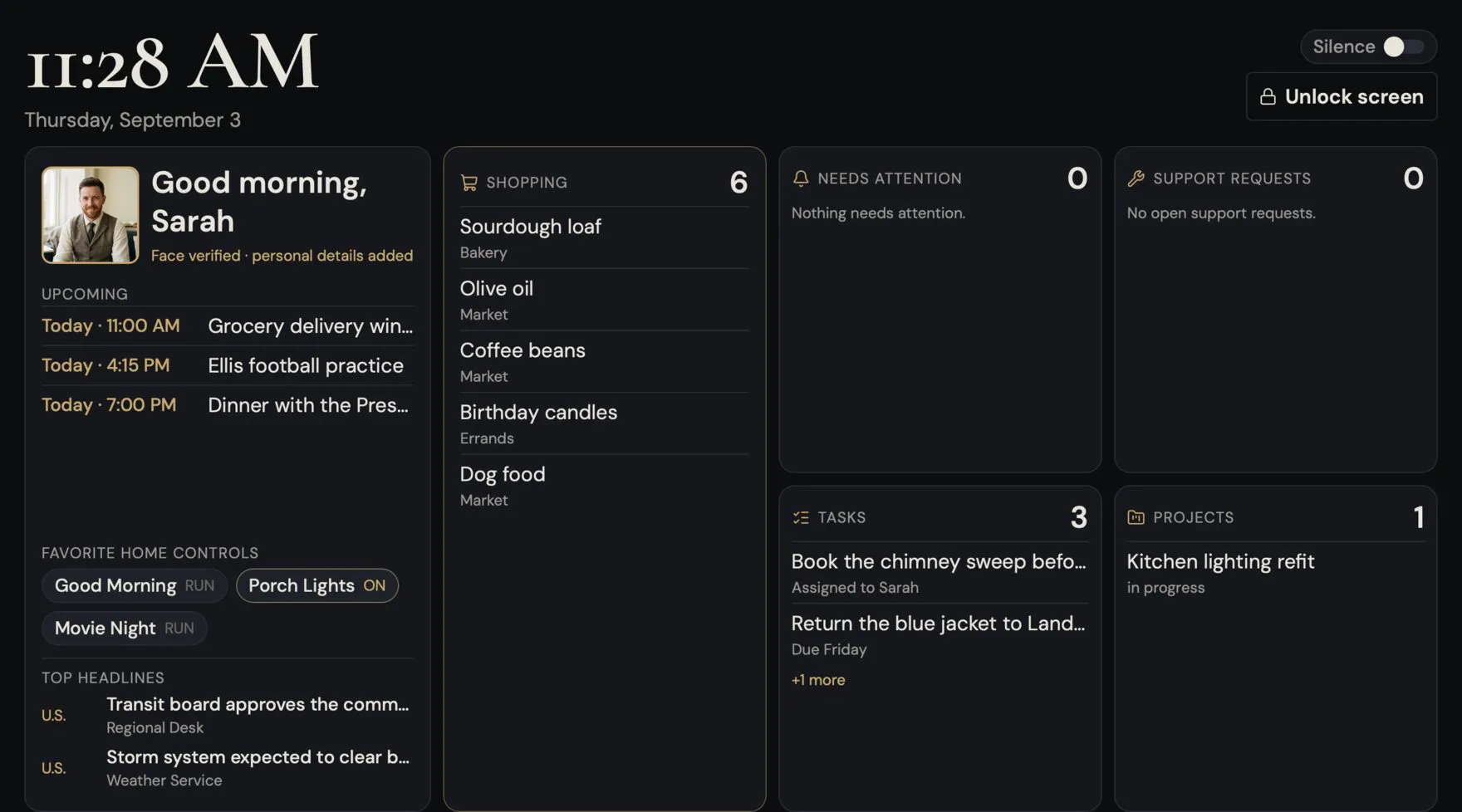
Start with the fit.
Consider Skylight Calendar
Consider Skylight when what you want is the family’s schedule, chores and grocery list on one screen that everyone can see and touch, bought once and set up yourself, especially with children who like ticking off their chores.
Skylight syncs Google, Apple, Outlook, Yahoo, Cozi and Readdle calendars onto one color-coded touchscreen, and its free features cover calendars, chores and lists on the device or in the mobile and desktop apps. Calendar Plus imports events and lists from email and pictures, tracks habits and adds rewards. [1]
Consider PrivateChief
Consider PrivateChief when the calendar is the easy part and the work around it is not: keeping private plans apart from family ones, noticing what is coming, following up and carrying projects, with engineers responsible for all of it.
A useful starting point is the Household Office: keeping documents and administrative work in order. The Chief prepares, organizes and explains; licensed professional advice and hands-on care remain with people.
Compare the work and the service.
| What matters | Skylight Calendar | PrivateChief, in-home option |
|---|---|---|
| What it is | A touchscreen family calendar bought once, in three sizes: a 10-inch countertop model, a 15-inch for the counter or the wall, and the 27-inch Calendar Max for the wall only. A free mobile app comes with it. [2] | A monthly service with a named AI Chief. The in-home option adds a private hub that runs the household and an 11-inch touchscreen wall unit in each room you choose. Hosted service works through the iPhone, iPad, Android and Mac apps alone, with no wall unit. |
| The calendar | Syncs Google, Apple, Outlook, Yahoo, Cozi and Readdle calendars, and any calendar with a public sharing link. Each family member has a color, events can be added on the screen or in the app, and the screen shows day, week and month views with the weather at the time and place of each event. [1] | Two calendars in one: each member’s private calendar, which only they can see, and the household calendar everyone shares. Connected Google and Apple calendars appear alongside, and an event can be saved to one you have allowed PrivateChief to write to. There is no Outlook calendar connection today. |
| Getting events in | With Calendar Plus, Sidekick, which Skylight calls a magic family assistant, imports events from school emails you forward, and it can also generate recipes and create lists. [5] | Type it in the app, or tell the Chief at the wall or in a message. Your own plans go on your private calendar unless you say otherwise, and household events go on with the right people attached, so the right phones get the reminder. Turn on Announce at home and the wall units say it out loud. |
| Chores and to-dos | A free Tasks Manager gives each person an interactive checklist of chores and routines to tick off on the screen. Calendar Plus adds stars that build towards rewards the parents choose. [1] | A shared household To-Do List with a name and a due date on each job. A maintenance plan puts recurring jobs, such as the furnace filter every three months, back on the list when they come due, and each person’s morning briefing lists the jobs assigned to them. It is a plain household list, without star charts or rewards for children. |
| Lists and groceries | Custom lists the whole family can use on the device or in the free app, and a grocery list whose items can go into an Instacart order in two taps (US only). [4] | Shared lists, such as groceries, the hardware store and Thanksgiving dinner, grouped by aisle, with quantities, shopper notes and favorites that go back on in one tap. Say “add bagels to the grocery list” at home and every screen catches up within seconds. |
| Meals | Calendar Plus plans a week of meals in about five minutes and shares them with the whole family on the screen, and Sidekick can generate recipes. [5] | PrivateChief has no meal planner or recipe box. Recipes saved as documents or photographs can be filed in the household’s Documents library, where the Chief can find one and read it to you. |
| Photos | Calendar Plus turns the calendar into a photo frame when it is not in use, showing photos, videos and captions uploaded from the Skylight app. [5] | One family album. When nobody is in front of a wall unit it plays as a slideshow, and it goes back to the household screen as soon as it sees someone. Anyone in the family adds pictures from a phone or Mac, up to twenty at a time, and they are kept on the home’s own hub. |
| Beyond the calendar | Skylight describes the calendar as parents’ “second brain”: the family’s plans, chores and lists made visible in one shared place, so that nobody has to hold everything in their head. [1] | A Chief that does some of the work as well as showing it. It notices what is coming, such as a birthday on Saturday, carries projects over days, such as comparing refinance quotes, and keeps track of what is waiting on someone else, such as an email to the town about leaf pickup. |
| Setup and support | You set it up yourself, and Skylight says that takes 10 minutes or less. Customer support is available 24/7, and returns are free for four months. [3] | PrivateChief engineers scope and install it, then handle monitoring, updates, encrypted backups and support. Mention a problem to your Chief and it becomes a tracked request to our team. |
| Privacy | Skylight says it is certified by data privacy frameworks and commits never to sell customer data to third parties. The calendar needs a Wi-Fi connection at all times. [1] | The working household record stays on the private hub in your home, and each member’s private calendar is kept apart from the household’s. Limited context goes to contracted AI services when a request needs it, under terms that forbid training. |
Read PrivateChief’s privacy and oversight boundaries, supported integration details and setup process. This comparison uses published documentation; it is not a head-to-head performance test.
See the household screens.
Five short narrated walkthroughs of the real PrivateChief app, with the Ashfords, a family invented for the demonstration, and their Chief, Savannah.
 Calendar
Family plans and private ones, side by side.
 Shopping Lists
One list the whole house can add to.
 To-Do List
Who is doing what, around the house.
 Photos
The family album, back on the wall.
 Today
TodayYour whole day, on one private screen.
Where Skylight is the better choice.
Skylight is better at
- A calendar on the wall, for the price
- From $149.99, bought once, and syncing, chores, lists and the app need no subscription. If what you want is the family’s schedule where everyone can see it, Skylight is the better buy by a long way.
- Setting it up yourself
- Out of the box and running in minutes, with no installer, no appointment and no monthly service.
- Children’s chores
- A tick-off chore chart made for children, with stars, rewards and Disney characters on Calendar Plus. Our To-Do List is a plain household list.
- Meal planning
- A week of meals planned in minutes and shown to everyone. PrivateChief has no meal planner.
- More calendars, bigger screens
- Outlook, Yahoo and Cozi calendars sync as well as Google and Apple, and the screens run from 10 to 27 inches, with swappable Snap Frames on Calendar 2. Our wall unit is an 11-inch tablet in a mount.
PrivateChief is better at
- Someone who runs the calendar
- Tell the Chief, and the event goes on the right calendar with the right people attached. It raises what is coming, such as Grandma’s birthday on Saturday, before anyone asks.
- Private plans beside family ones
- Each member keeps a private calendar that only they can see next to the household’s, and their own Today screen gathers their schedule, tasks and decisions in private.
- Knowing who is in the room
- The wall unit recognizes each enrolled member on sight and greets them by name, with their own reminders and schedule.
- Work that leaves the house
- Projects tracked over days, follow-ups on what other people owe you, reminders that reach you by text when you are out, and simple phone calls placed after you confirm them.
- People who look after it
- Engineers who install it, watch over it and fix it, so the household screen never becomes one more thing for you to maintain.
How much does Skylight Calendar cost?
Skylight Calendar
From $149.99
One-time US starting prices: the 10-inch Calendar $149.99, the 15-inch Calendar with refurbished memory $229.99, the 15-inch Calendar 2 $299.99 and the 27-inch Calendar Max $569.99. [2]
On Skylight’s product pages those prices include the Plus plan, whose first month is free and which then costs $79 a year. Bought without Plus, the 15-inch Calendar 2 is $319.99, and the Wood and Shadow Box frames cost more. [3]
Calendar Plus on its own is $79 a year. It adds Sidekick, meal planning, the photo and video screensaver, rewards and Disney Mode. [5]
PrivateChief
From $149 / month
Personal is $149 a month. The wall units come with the in-home option, whose equipment you buy directly at about the prices on our equipment list: roughly $315 for the private hub, and for each room an 11-inch Samsung Galaxy Tab A11+ of about $219 with our $19 wall mount. Installation is quoted for the job.
AI usage is separate: bring your own OpenAI account, or use capacity we supply at our cost plus 30%. Metered voice is billed at cost plus 30% either way. Hosted service, without wall units, has a fixed $299 onboarding fee. No annual commitment or cancellation fee.
Skylight is a single purchase with an optional $79 a year; PrivateChief is a monthly service. A year of PrivateChief Personal is $1,788 in service fees before equipment and AI usage, about the price of twelve 10-inch Skylights. If you want a calendar on the wall, buy Skylight, and we would rather say so. PrivateChief’s fee pays for a Chief that runs the calendar and the rest of the household’s work, and for the people who look after it.
Before you choose.
Is Skylight Calendar a good alternative to PrivateChief?
For many families, yes. If what you want is one screen with everyone’s schedule, chores and grocery list, Skylight does that well from $149.99, and you can set it up yourself in minutes. PrivateChief is for households that want the work done as well as shown: a Chief that keeps private and shared calendars, follows up, carries projects and has engineers responsible for it.
What is a family command center?
It is the one place in the house, usually in the kitchen or by the door, where the household’s schedule, chores, lists and notices are kept for everyone to see. It used to be a corkboard and a paper calendar; now it is often a screen. Skylight makes the screen. PrivateChief adds a Chief who keeps it up to date and acts on it.
Does PrivateChief have a wall display like Skylight?
Yes, with the in-home option: an 11-inch touchscreen wall unit in each room you choose, showing the household’s schedule, shopping, tasks and photos, and recognizing each enrolled member as they walk up. Hosted service has no wall unit and works through the apps. Skylight’s screens are larger, up to 27 inches, and you can buy one without any service.
Can I use Skylight and PrivateChief together?
Yes. Nothing about one prevents the other, and this page does not claim any integration between them. Both can show a Google or Apple calendar you connect to each, so if you run both, decide where the family adds events, so nothing is entered twice.
Does Skylight use AI?
Yes. Calendar Plus includes Sidekick, which Skylight calls a magic family assistant: it imports events from forwarded school emails, generates recipes and creates lists. PrivateChief runs on OpenAI models. The difference is not whether there is AI; it is a calendar screen with a helper for getting events in, set against a managed service with a Chief that carries the household’s work.
Also considering Apple HomeView or Alexa+ or ChatGPT? Those comparisons are here too.
Bring the week that keeps slipping.
Tell us who lives in the house and what keeps falling through the gaps. We will say what a Chief would take on, and where a Skylight on the wall would serve you just as well.
Sources and scope
- Skylight: Skylight Calendar, features and frequently asked questions
- Skylight: compare calendars (sizes, starting prices and free features)
- Skylight: 15-inch Calendar 2 (prices with and without Plus, setup and support)
- Skylight: 27-inch Calendar Max (lists and Instacart grocery ordering)
- Skylight: Calendar Plus, $79 a year (Sidekick, meal planning, photo screensaver, rewards)
Reviewed 19 October 2026. Pricing and availability can change. Prepared by PrivateChief, the service being compared. Skylight Calendar is a trademark of its respective owner; no affiliation or endorsement is implied.

